> ## Documentation Index
> Fetch the complete documentation index at: https://docs.versori.com/llms.txt
> Use this file to discover all available pages before exploring further.
# Filter
> Filter data in an Integration workflow
 ## What is Filter?
Apply conditional logic to an Integration in order to direct data flow or to allow / restrict certain types of data
flowing through the Integration.
## Logical Operators
#### AND
The AND logical operator combines two or more single filter expressions into one filter condition. Each single
expression must evaluate as truthy in order for the combined filter condition to pass.
## What is Filter?
Apply conditional logic to an Integration in order to direct data flow or to allow / restrict certain types of data
flowing through the Integration.
## Logical Operators
#### AND
The AND logical operator combines two or more single filter expressions into one filter condition. Each single
expression must evaluate as truthy in order for the combined filter condition to pass.
 #### OR
The OR logical operator combines two or more single filter expressions into one filter condition. If any of the single
expression evaluates as truthy the filter condition will pass.
#### OR
The OR logical operator combines two or more single filter expressions into one filter condition. If any of the single
expression evaluates as truthy the filter condition will pass.
 ## Comparison Operators
Comparison operators define how the expression will be evaluated.
#### Greater than
"Greater than" is a comparison operator used to show that one number or quantity is larger than another.
For example, an Integration requirement might be to filter all Products whereby if the Product price is greater than 10
the filter should pass.
#### Greater than or equal to
"Greater than or equal to" is a comparison operator used to show that one number or quantity is either larger than or
equal to another.
For example, an Integration requirement might be to filter all Products whereby if the Product price is greater than or
equal to 10 the filter should pass.
#### Less than
"Less than" is a comparison operator used to show that one number or quantity is smaller than another.
For example, an Integration requirement might be to filter all Products whereby if the Product price is less than 10 the
filter should pass.
#### Less than or equal to
"Less than or equal to" is a comparison operator used to show that one number or quantity is smaller than or equal to
another.
For example, an Integration requirement might be to filter all Products whereby if the Product price is less than 10 the
filter should pass.
#### Equal to
"Equal to" is a comparison operator used to indicate that two values or expressions are the same in value.
#### Not Equal to
"Not Equal to" is a comparison operator used to indicate that two values or expressions are not the same in value.
#### Exists
"Exists" is a comparison operator used to determine if a value exists in another set of values
#### Contains
"Contains" is a comparison operator used to determine if a value exists in another set of values
#### Regular Expression
A regular expression (or regex) is a sequence of characters that defines a search pattern. It’s commonly used for
pattern matching within strings, such as checking whether a string matches a specific format or finding parts of text
that match certain criteria.
## Using Selectors in Filter
Selectors can be used to access data from any previous step in the workflow. Opening up the possibilites for any kind of
business logic to be applied to the data flowing through the Integration.
## Comparison Operators
Comparison operators define how the expression will be evaluated.
#### Greater than
"Greater than" is a comparison operator used to show that one number or quantity is larger than another.
For example, an Integration requirement might be to filter all Products whereby if the Product price is greater than 10
the filter should pass.
#### Greater than or equal to
"Greater than or equal to" is a comparison operator used to show that one number or quantity is either larger than or
equal to another.
For example, an Integration requirement might be to filter all Products whereby if the Product price is greater than or
equal to 10 the filter should pass.
#### Less than
"Less than" is a comparison operator used to show that one number or quantity is smaller than another.
For example, an Integration requirement might be to filter all Products whereby if the Product price is less than 10 the
filter should pass.
#### Less than or equal to
"Less than or equal to" is a comparison operator used to show that one number or quantity is smaller than or equal to
another.
For example, an Integration requirement might be to filter all Products whereby if the Product price is less than 10 the
filter should pass.
#### Equal to
"Equal to" is a comparison operator used to indicate that two values or expressions are the same in value.
#### Not Equal to
"Not Equal to" is a comparison operator used to indicate that two values or expressions are not the same in value.
#### Exists
"Exists" is a comparison operator used to determine if a value exists in another set of values
#### Contains
"Contains" is a comparison operator used to determine if a value exists in another set of values
#### Regular Expression
A regular expression (or regex) is a sequence of characters that defines a search pattern. It’s commonly used for
pattern matching within strings, such as checking whether a string matches a specific format or finding parts of text
that match certain criteria.
## Using Selectors in Filter
Selectors can be used to access data from any previous step in the workflow. Opening up the possibilites for any kind of
business logic to be applied to the data flowing through the Integration.
 ## Creating nested Filter conditions
For more complex filter requirements nested conditions can be implemented.
## Creating nested Filter conditions
For more complex filter requirements nested conditions can be implemented.
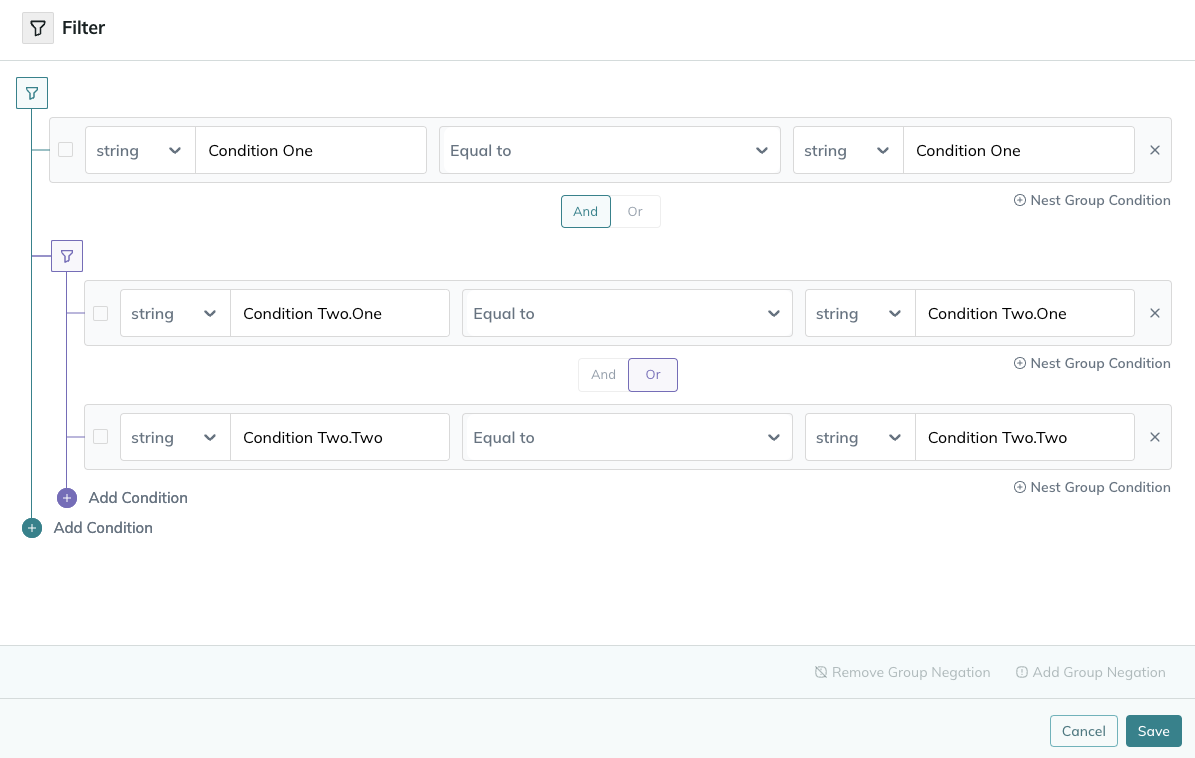
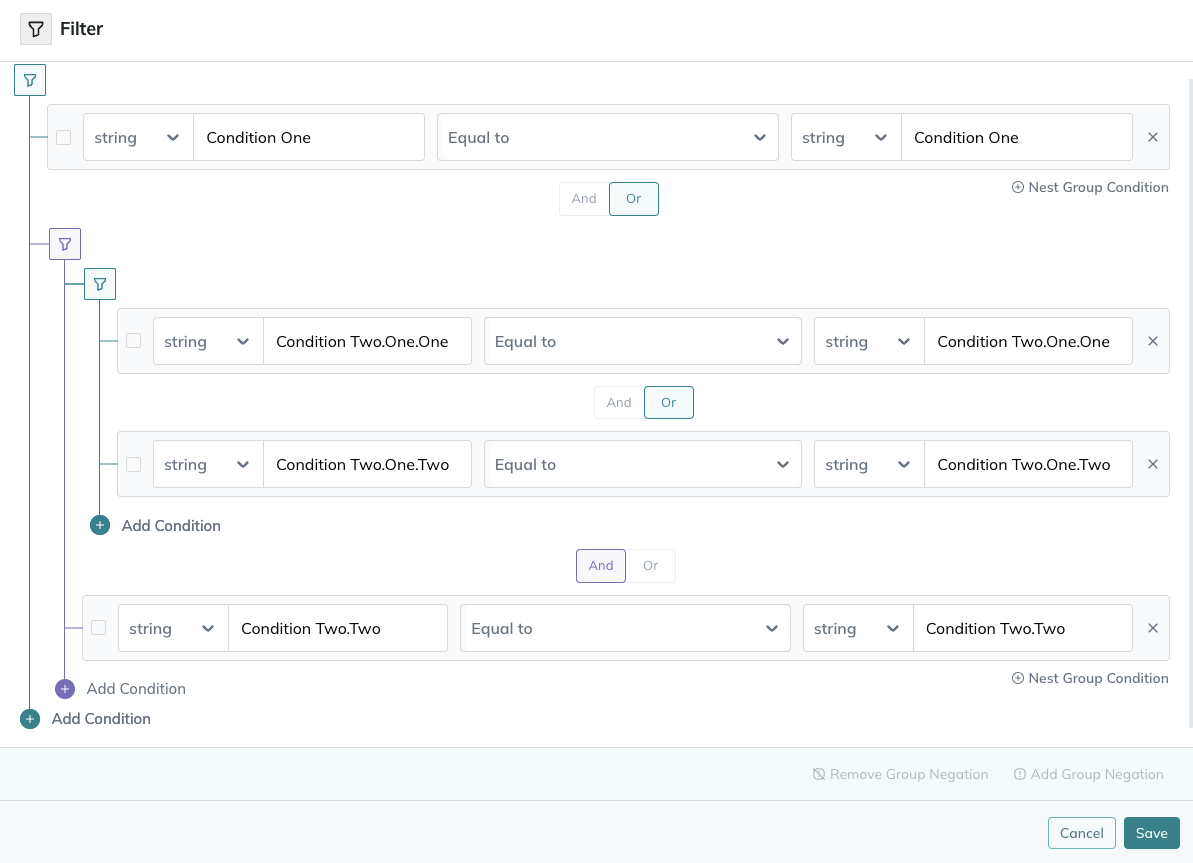 The Filter tool allows up to two levels of nesting. We have chosen this as a maximum depth of nesting as we believe
this will cover all requirements and should further nesting be required the Filter is most likely not the right tool
for this step of the workflow and some data manipulataion should be carried out.
For very complex logical filtering, the [code tool](./code-tool) can be used.
## Using negation
The Filter allows an expression to be negated should this fit the logical requirements. Either single expressions or
grouped expressions can be negated.
The Filter tool allows up to two levels of nesting. We have chosen this as a maximum depth of nesting as we believe
this will cover all requirements and should further nesting be required the Filter is most likely not the right tool
for this step of the workflow and some data manipulataion should be carried out.
For very complex logical filtering, the [code tool](./code-tool) can be used.
## Using negation
The Filter allows an expression to be negated should this fit the logical requirements. Either single expressions or
grouped expressions can be negated.
